


Climate Adaptation Planning Tool
This tool was designed to help USAID program managers make sound decisions about climate change during their planning activity phase. Several workshops were held, as well as an analysis of their existing documents to create a streamlined tool that allows teams to collaborate online.
My Role & Activities
Lead UX Designer | Research, faciliation, IA, prototyping, copywriting, design oversight
Problem
Program managers didn't have a framework to think about how climate change might affect their programs. They also lacked the ability to share their proposals with other team members. Even with the available resoures, many program managers were confused about how to proceed or what they might need to start. Another obstacle was a reluctantance to even begin the process since it wasn't clear what the time committment would be.
Solutions
-
Using their existing Drupal implementation, we created a web application that facilitated their thinking about the relationship of climate change and their programs.
-
Several faciliatated workshops were held to tease out requirements, contraints and goals.
-
Initial conceptual sketches were created followed by a high-fidelity, clickable prototype that mapped out key sections and gave stakeholders and users a better sense of what we might build.
-
An orientation screen was created that allows users to learn more about the tool and process, or jump straight into their work.
-
We mapped multple questions from the old form into conceptual steps, which provided focus and context for those unfamiliar with this process.
-
Each section begins with an overview that tells users 3 important pieces of information to help them feel comfortable and push them into action: 1) About the section 2) Time to complete section 3) What you'll need to get started.
-
A section called "My Decision Maps" was created that compiled different versions of their program maps, which are used to facilitate conversations with team members about how they might approach the creation of a paticular program.
-
We also created a help section that provides access to key terms, FAQs, and a curated list of resources to further help program managers research their options.
Project Artifacts
 Login Flow |  New vs Returning |  Step Templates |  Nav |  Orientation (prototype) |
|---|---|---|---|---|
 Step 1 (prototype) |  Outline Program (prototype) |  Step Overview (prototype) |  Dashboard (prototype) |  Decision Map (prototype) |
 Home (prototype) |  Logged In (prototype) |  Home |  Home Logged In | 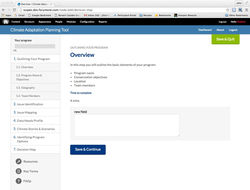 Step 1 Overview |
 Program Outline |  Primary Impact |  Time Horizon Planning |  Stories & Scenarios |  Dashboard |
 Decision Map Example |