
Product Integration
Several standalone products needed to be integrated into a new tool to create an interactive handwriting ecosystem that allows teachers to seamlessly move between products.
My Role & Activities
UX Lead | Brainstorming, sketching, wireframing, high-fidelity comps.
Problem
While users have control to show/hide the main navigation, it was quickly becoming bloated and unfocused from multiple requests to integrate different products into the the design, which had already been coded and was live. The challenge was to create an experience that felt integrated despite not being planned for; basically, to not Frankenstein the thing. There was also the need to introduce users to products they were unaware of and had not necessarily requested.
Solutions
1. Rather than cramming additional links into the main navigation, I took a page from Slack, Google and Jira and added a vertical master nav to organize the existing structure.
2. This provided a much needed hierarchy and allowed each product/section to focus on the tasks specific to their domain.
3. Additionally, this newly freed up space allowed room to orient new users who might be unaccustomed to certain products.
Project Artifacts
 DTT HITT Options |  Use Cases |  Home |  Plan |
|---|---|---|---|
 Demo |  Tap functions drawer | 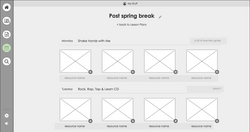 Lesson plan example |  Saved resources |
 Plan copy |  Plan Week |  TG intro |  Screen Shot 2018-02-18 at 12.53.14 PM |
 Custom – 28 |  HWT Order |  Custom |  Custom copy |
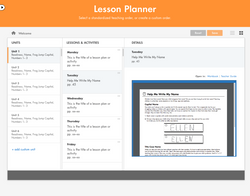 Custom – 27 |  Custom – 26 |  lesson details |  create lesson plan |
 multiple cards |  Option 4 – 1 |  Option 4 |  Option 4 open |
 Option 4 wdt |  Option 4 lan |  Option 4 aplus |