
KWT Onboarding
The KWT app needed a better onboarding experience. My first step was to map out the existing process from purchase to fulfillment to activation & use and conduct user research and testing. Using this information, our team was able to identify gaps in the onboarding experience and focus our time on those areas.
My Role & Activities
UX Lead | User research, interviews, usability testing, sketching, wireframing, process flow diagramming,
Problem
Disjointed experience from purchase to fulfillment to activation & use. Legacy information had been lost and nobody knew what the experience was and which systems were involved. Different audiences require different onboarding information.
Solutions
-
Mapped out existing experience to identify opportunities for improvement
-
Intro wizard asking for role and setup type
-
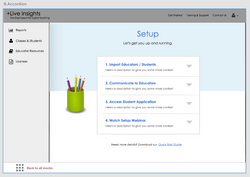
Intro screen with next steps
-
Customized setup screens for different audiences
-
Reorganized utility nav to focus on training and support
-
Virtual tour
-
Welcome video
-
Robust FAQs & Quick Tip guide
-
Redesigned emails and email lifecycle
Project Artifacts
 IMG_9897 |  IMG_0185 |  IMG_0184 |  IMG_0186 |  IMG_9890 |
|---|---|---|---|---|
 Screen Shot 2017-07-03 at 1.45.51 PM |  Screen Shot 2017-07-03 at 1.45.42 PM |  IMG_9835 |  IMG_9700 |  IMG_9696 |
 IMG_9694 |  IMG_9891 |  IMG_0183 |  Screen Shot 2017-07-03 at 1.40.33 PM |  Screen Shot 2017-07-03 at 1.38.07 PM |
 Screen Shot 2017-07-03 at 1.38.59 PM |  Screen gallery 2 |  Screen Shot 2017-07-03 at 1.25.47 PM |  Screen Shot 2017-07-03 at 1.26.50 PM |  Screen Shot 2017-07-03 at 1.26.01 PM |
 Setup |  Screen gallery 1 |  Quick Tip |  01_Unlock |  03_SetupStyle |
 02_AccountType |  04_+LIWelcome |  05_SetUp |  06_SetUp_Open |  04_ContactUs_v2 |
 01_Training & Support |  03_AccountSettings |